Access Control
Control who can trade and create markets on your venue — open access, token gating, whitelists, or custom logic.
OddMaki venues have two independent access gates at the venue level. Trading access can also be overridden per-market for more granular control. Each gate points to a contract implementing IAccessControl, or the zero address for public access.
Two Independent Gates
| Gate | Controls | Scope |
|---|---|---|
tradingAccessControl | Who can place orders and trade | Venue-level, can be overridden per-market |
creationAccessControl | Who can create markets | Venue-level only |
Both are set at venue creation and can be updated later via client.venue.updateVenue(). The venue operator always bypasses both checks.
Every access control contract implements a single function:
interface IAccessControl {
    function isAllowed(address user) external view returns (bool);
}
If the external call reverts, access is denied (the protocol uses try/catch internally).
How Access Is Checked
Trading access (checked when placing orders):
- Venue operator? → always allowed
- Market-level AC override set? → call
isAllowed(user)on the market-level contract - Venue-level
tradingAccessControlset? → callisAllowed(user)on the venue-level contract - Neither set (
address(0))? → public, anyone can trade
Creation access (checked when creating markets):
- Venue operator? → always allowed
- Venue-level
creationAccessControlset? → callisAllowed(user)on the venue-level contract - Not set (
address(0))? → public, anyone can create
Open Access
Set the access control address to 0x0000000000000000000000000000000000000000 (the zero address) for permissionless access. This is the default.
const tx = await client.venue.createVenue({
  // ...
  tradingAccessControl: '0x0000000000000000000000000000000000000000',   // anyone can trade
  creationAccessControl: '0x0000000000000000000000000000000000000000',  // anyone can create markets
});
Where to manage access control
Manage your venue's access control from the OddMaki App — open app.oddmaki.com → your venue → Access tab. The SDK is the programmatic alternative for scripts and bots; the Venue Starter does not expose venue-level access-control management.
| Action | OddMaki App | SDK |
|---|---|---|
| View the current trading and creation gates | Access tab on the venue dashboard | client.venue.getVenue() |
| Add/remove addresses on a whitelist AC | Access → Manage whitelist | client.accessControl.addToWhitelist() / removeFromWhitelist() |
| Deploy a new whitelist / token gate / NFT gate | Access → Deploy gate | client.accessControl.deployWhitelist() / deployTokenGated() / deployNFTGated() |
| Swap in a different AC contract at the venue level | Access → Edit gates | client.venue.updateVenue() |
| Override trading AC for a specific market | (per-market AC overrides are SDK-only) | client.accessControl.setMarketTradingAC() |
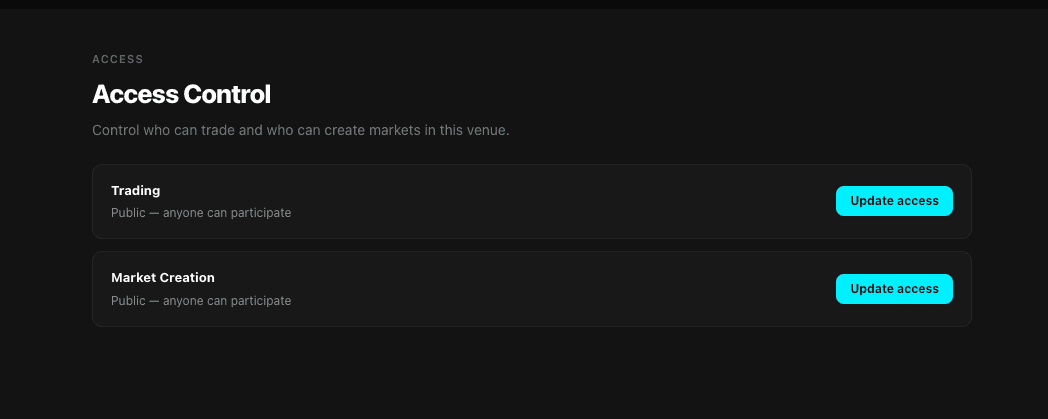
Pick whichever is easier for the task at hand — a one-off policy tweak in the OddMaki App, or a scripted flow in the SDK.
Pre-built Contracts
The protocol ships three access control contracts you can deploy directly through the SDK — no need to write or deploy Solidity yourself.
| Contract | Use Case | Configuration |
|---|---|---|
| WhitelistAccessControl | Owner-managed address allowlist | Mutable: add/remove addresses after deploy |
| TokenGatedAccessControl | ERC-20 minimum balance check | Immutable: token and minBalance set at deploy |
| NFTGatedAccessControl | ERC-721 or ERC-1155 ownership check | Immutable: NFT contract set at deploy |
Deploy any of these via the SDK:
// Deploy a whitelist — caller becomes owner
const hash = await client.accessControl.deployWhitelist();

// Deploy a token gate — holders of ≥100 USDC can access
const hash = await client.accessControl.deployTokenGated({
  token: '0xUSDCAddress...',
  minBalance: parseUnits('100', 6),
});

// Deploy an NFT gate — any holder of the ERC-721 can access
const hash = await client.accessControl.deployNFTGated({
  nftContract: '0xNFTAddress...',
  isERC1155: false,
  tokenId: 0n,
});

// Deploy an ERC-1155 gate — holders of a specific token ID
const hash = await client.accessControl.deployNFTGated({
  nftContract: '0xERC1155Address...',
  isERC1155: true,
  tokenId: 42n,
});
The deployed contract address is emitted in the AccessControlDeployed event log. Extract it from the transaction receipt.
Market-Level Overrides
Trading access can be overridden for individual markets. This lets you apply a different access policy to specific markets while keeping a venue-wide default. Creation access is venue-level only — there is no per-market override for market creation.
// Set a different AC contract for a specific market
const hash = await client.accessControl.setMarketTradingAC({
  marketId: 42n,
  acContract: '0xMarketSpecificWhitelist...',
});

// Remove the override (falls back to venue-level AC)
const hash = await client.accessControl.removeMarketTradingAC({
  marketId: 42n,
});

// Query: can this user trade on this specific market?
const allowed = await client.accessControl.canTradeOnMarket({
  user: '0xUserAddress...',
  marketId: 42n,
});
Only the venue operator can set or remove market-level overrides.
Managing Whitelists
If your venue's trading or creation gate is a WhitelistAccessControl contract, the OddMaki App's Access tab shows a Manage whitelist button next to the gate. That opens a modal where the whitelist owner can paste addresses to add or remove — the same operations described below, just UI-driven.
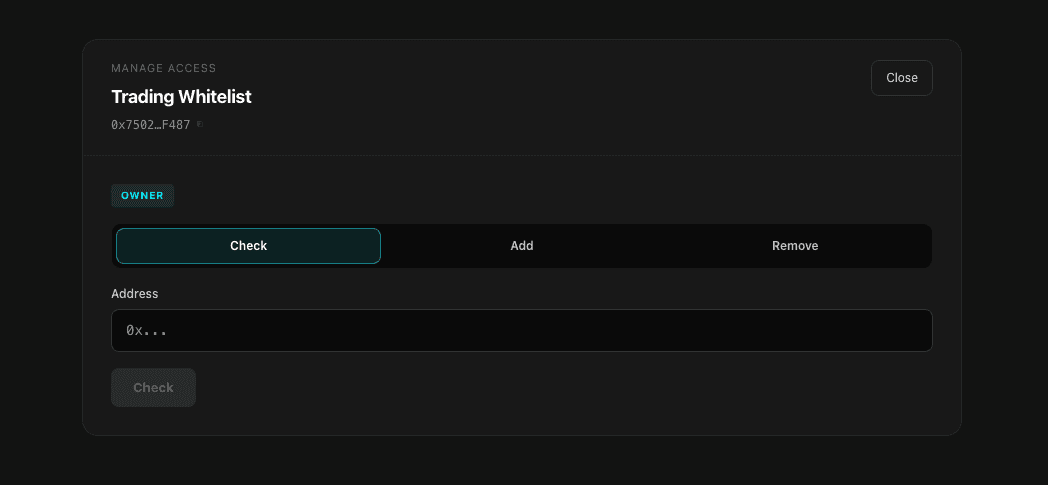
For programmatic or batch updates, the SDK exposes methods that call the whitelist contract directly (not through the Diamond).
// Add users to the whitelist (owner only)
await client.accessControl.addToWhitelist({
  acContract: '0xWhitelistAddress...',
  users: ['0xAlice...', '0xBob...'],
});

// Remove users
await client.accessControl.removeFromWhitelist({
  acContract: '0xWhitelistAddress...',
  users: ['0xAlice...'],
});

// Check if a user is whitelisted
const ok = await client.accessControl.isWhitelisted({
  acContract: '0xWhitelistAddress...',
  user: '0xAlice...',
});
Updating Venue-Level Access Control
Update either gate after venue creation:
const hash = await client.venue.updateVenue({
  venueId: 1n,
  name: 'My Venue',
  metadata: '',
  tradingAccessControl: newTradingAccessControl,
  creationAccessControl: newCreationAccessControl,
  feeRecipient: '0xFeeRecipient...',
});
Changes take effect immediately. The feeRecipient cannot be the zero address.
Custom Contracts
Any contract that implements the IAccessControl interface works. This lets you build logic beyond what the pre-built contracts offer — time windows, reputation scores, multi-sig approvals, or any onchain condition.
What's Next
- Custom Access Logic → — write your own IAccessControl implementation
- SDK Reference → — full AccessControl module API
- Fee Structure → — configure your venue's fee model
Fee Structure
Understand OddMaki's four-layer taker-only fee model — venue fee, creator fee, protocol fee, and match operator fee.
Oracle Settings
Configure UMA Optimistic Oracle parameters for your venue — assertion bonds, rewards, and liveness periods. Price markets use Pyth and do not require these.